🎯How to Create Animated Tabs with GSAP: A Step-by-Step Guide
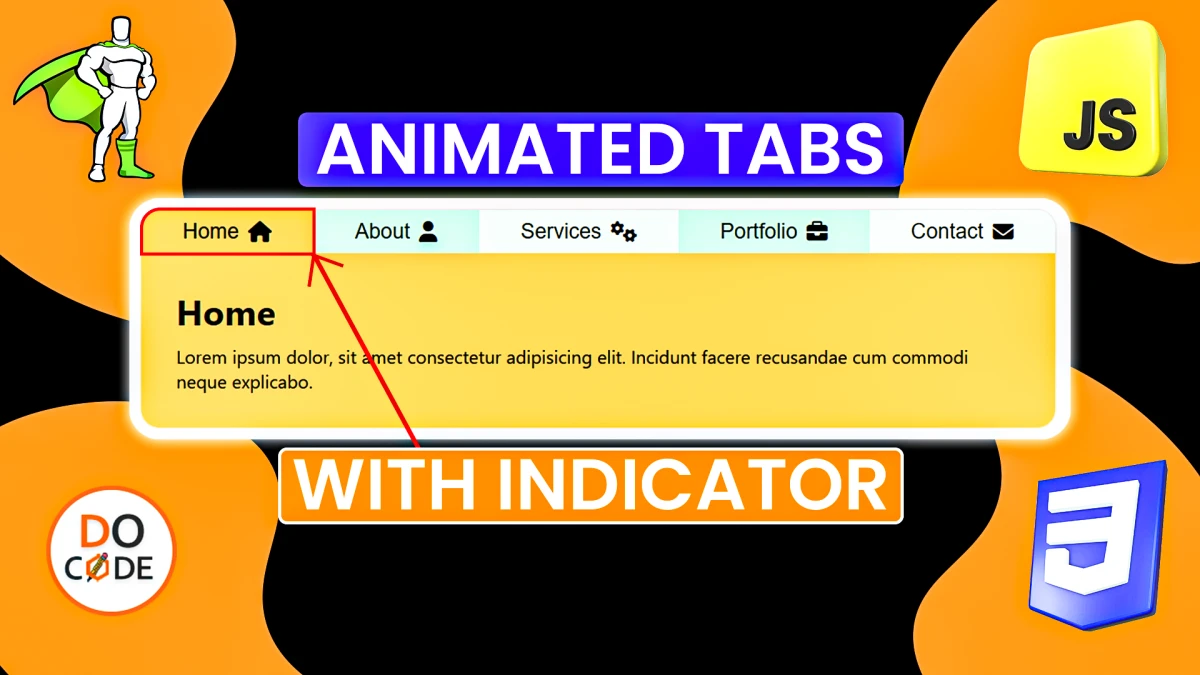
In this blog post, you'll learn how to create smooth and interactive tab navigation with GSAP (GreenSock Animation Platform). We'll build a stylish tab menu with an animated indicator, sliding content panels, and a fade-in effect using HTML, CSS, and JavaScript.
✅ Live Demo
1️⃣ HTML Structure
We'll start by creating the basic HTML structure for the tab menu and content panels.
<!DOCTYPE html>
        <html lang="en">

        <head>
            <meta charset="UTF-8">
            <meta name="viewport" content="width=device-width, initial-scale=1.0">
            <title>Magic Navigation Menu</title>
            <!-- Font Awesome for icons -->
            <link rel="stylesheet" href="https://cdnjs.cloudflare.com/ajax/libs/font-awesome/6.7.2/css/all.min.css" />
        </head>
        <body>
            <div class="tabsContainer">
                <div class="tabsBox">
                    <div class="indicator"></div>
                    <button><span>Home</span> <i class="fas fa-home"></i></button>
                    <button><span>About</span> <i class="fas fa-user"></i></button>
                    <button><span>Services</span> <i class="fas fa-cogs"></i></button>
                    <button><span>Portfolio</span> <i class="fas fa-briefcase"></i></button>
                    <button><span>Contact</span> <i class="fas fa-envelope"></i></button>
                </div>
                <div class="tabsContentContainer">
                    <div class="contentBox">
                        <h3>Home</h3>
                        <p>Lorem ipsum dolor, sit amet consectetur adipisicing elit. Incidunt facere recusandae cum commodi
                            neque explicabo.</p>
                    </div>
                    <div class="contentBox">
                        <h3>About</h3>
                        <p>Lorem ipsum dolor, sit amet consectetur adipisicing elit. Incidunt facere recusandae cum commodi
                            neque explicabo.</p>
                    </div>
                    <div class="contentBox">
                        <h3>Services</h3>
                        <p>Lorem ipsum dolor, sit amet consectetur adipisicing elit. Incidunt facere recusandae cum commodi
                            neque explicabo.</p>
                    </div>
                    <div class="contentBox">
                        <h3>Portfolio</h3>
                        <p>Lorem ipsum dolor, sit amet consectetur adipisicing elit. Incidunt facere recusandae cum commodi
                            neque explicabo.</p>
                    </div>
                    <div class="contentBox">
                        <h3>Contact</h3>
                        <p>Lorem ipsum dolor, sit amet consectetur adipisicing elit. Incidunt facere recusandae cum commodi
                            neque explicabo.</p>
                    </div>
                </div>
            </div>

            <!-- GSAP CDN -->
            <script src="https://cdnjs.cloudflare.com/ajax/libs/gsap/3.12.5/gsap.min.js"></script>
        </body>

        </html>
✅Explanation:
- The
.tabsContainerholds both the tab menu and content panels. - The
.indicatoris a dynamic element that moves with the active tab. - The
.tabsContentContainercontains all the content panels, which will slide horizontally.
🎨CSS Styling
Next, let's add some styling to make the tabs visually appealing.
/* General Styles */
    * {
        margin: 0;
        padding: 0;
        box-sizing: border-box;
    }

    html,
    body {
        width: 100%;
        height: 100%;
        position: relative;
    }

    body {
        font-family: 'Segoe UI', Tahoma, Geneva, Verdana, sans-serif;
        background: #f1f1f1;
        height: 100vh;
        display: flex;
        justify-content: center;
        align-items: center;
        padding: 1rem;
    }

    /* css for tabsContainer */
    :root {
        --bg1: #b3ffe5;
        --bg2: #e5fff6;
        --bg3: #ffc552;
    }
.tabsContainer{
    max-width: 800px;
    border-radius: 1rem;
    overflow: hidden;
    box-shadow: 0px 0px 2px rgba(0, 0, 0, 0.281);
}
    .tabsContainer .tabsBox {
        display: flex;
        width: 100%;
        position: relative;
        isolation: isolate;
        overflow-x: auto;
    }

    .tabsContainer .tabsBox button {
        border: none;
        outline: none;
        background-color: var(--bg1);
        padding: 0.5rem 1rem;
        flex-grow: 1;
        font-size: clamp(1rem, 1.2vw, 1.2rem);
        display: flex;
        justify-content: center;
        align-items: center;
        gap: 0.5rem;
        cursor: pointer;
    }

    .tabsContainer .tabsBox button:nth-child(even) {
        background-color: var(--bg2);
    }

    .tabsContainer .tabsBox button>* {
        z-index: 1;
    }

    .tabsContainer .tabsBox .indicator {
        position: absolute;
        top: 0;
        left: 0;
        /* width: 100px; */
        height: 100%;
        background-color: var(--bg3);
    }

    .tabsContentContainer {
        display: flex;
        overflow: hidden;
    }

    .tabsContentContainer .contentBox {
        flex-shrink: 0;
        width: 100%;
        padding: clamp(1rem,2vw,2rem);
        background-color: var(--bg3);
    }

    .tabsContentContainer .contentBox h3 {
        margin-bottom: 0.5rem;
        font-size: clamp(1.5rem, 2vw, 2rem);
    }
✅Explanation:
- The
.tabsContainerhas a max width with rounded corners and a subtle box shadow. - Each tab button uses flexbox for alignment.
- The
.indicatormoves dynamically on tab click. - The
.contentBoxuses flexbox to arrange the content horizontally.
🚀JavaScript & GSAP Animation
Now, let's add the GSAP animations to make the tabs interactive.
document.addEventListener('DOMContentLoaded', () => {
            // select neccessary elements in js
            let tabButtons = [...document.querySelectorAll('.tabsBox button')]
            let tabIndicator = document.querySelector('.tabsBox .indicator');
            let contetnBox = [...document.querySelectorAll('.tabsContentContainer .contentBox')]
            // flag
            let activeIndex;
            // initialise tab animation
            animateTabs();
            // add gsap logic
            tabButtons.forEach((tab, index) => {
                tab.addEventListener('click', () => {
                    animateTabs(tab, index)
                })
            })

            function animateTabs(tab = tabButtons[0], index = 0) {
                if (activeIndex === index) return;
                activeIndex = index;
                //moveIndicator
                gsap.to(tabIndicator, {
                    x: tab.offsetLeft,
                    width: tab.offsetWidth,
                    duration: 0.3,
                    ease: "power2.out"
                })
                //move contentBox
                gsap.to(contetnBox, {
                    x: -index * 100 + "%",
                    duration: 0.5,
                    ease: "power2.out"
                })
                //animate h3 and p tag
                let activeBox = contetnBox[index];
                let [h3, p] = activeBox.children;

                gsap.timeline()
                    .fromTo([h3, p],
                        {
                            opacity: 0,
                            y: 5
                        },
                        {
                            opacity: 1,
                            y: 0,
                            duration: 0.3,
                            ease: "power2.out",
                            stagger: 0.2,
                            delay: 0.2,
                        }
                    )
            }
        })
✅Explanation:
- Selectors grab the necessary DOM elements (
tabsBox,indicator,contentBox). - On tab click:
- The
.indicatormoves with GSAP'sgsap.to()method. - The content slides horizontally with
x: -index * 100%. - The
.timeline()creates a staggered fade-in effect for the heading and paragraph.
- The
🚀Conclusion
With GSAP, you can easily create smooth, interactive tab navigation with dynamic animations. This solution provides:
- Clean tab switching animation
- Efficient performance with GSAP’s optimized engine
- A modular and reusable component
🔥 Try it yourself and enhance your website with animated tabs powered by GSAP!
Tags
magic navigation menu
GSAP tab animation
animated tab navigation
smooth tab transition
HTML CSS GSAP tabs
interactive navigation menu
GSAP menu animation
animated content tabs
dynamic tab indicator
JavaScript tab animation